Best 6 Desktop MP3 Tag Editors (Windows 11 & Mac)
1 MP3Tag - Best for Windows Power Users
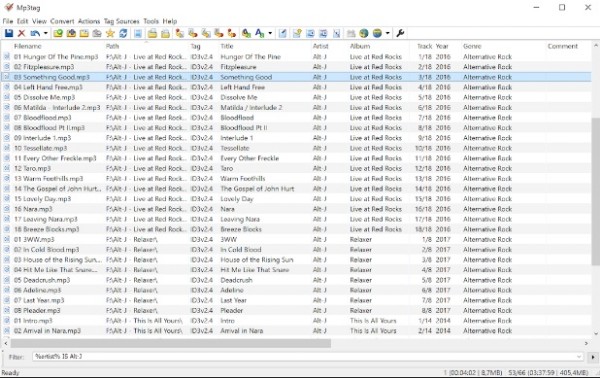
MP3Tag is the go-to batch MP3 tagger for Windows and Mac users. It supports a wide range of formats such as ID3v1, ID3v2.3, ID3v2.4, iTunes MP4, and WMA. It is perfect for professional-level music collection management. After editing its tags, you can use a medata viewer to open the audio file to see if it is working.
Tips
Always backup your library before running a complex Regex Action. One wrong character in your script can accidentally wipe out the artist tags for your entire collection.
Price: Free (Win)/Paid (Mac)
OS Supported: Windows 11, macOS
Download URL: https://www.mp3tag.de/en/
Features
- Type and import tags from Discogs, freedb, MusicBrainz and other online databases.
- Create and manage playlists while editing automatically.
- Regex support for advanced string replacement and batch renaming.
- Support batch tag editing in many formats at once.
PORS
- Scriptable Automation: "Actions" save hours of manual work for large collections.
- Lightweight: Extremely small footprint; starts up in less than a second.
- Multi-Format Mastery: Handles nearly every audio container in existence.
- Excellent Community: Decades of tutorials and ready-made scripts available.
CONS
- Mac Cost: Unlike the Windows version, the Mac app is a premium purchase.
- Dense UI: The grid-based interface is efficient but visually "busy" for beginners.
- Manual Setup: Requires some effort to configure online database links.
2 AnyMP4 Video Converter Ultimate - Best All-in-One Multimedia Suite
AnyMP4 Video Converter Ultimate is a professional-grade all-in-one solution for 2026. Its built-in Media Metadata Editor allows users to edit ID3 tags for MP3, WMA, M4A, and FLAC files with zero learning curve. Beyond simple tagging, it supports 70x faster batch MP3 tagger processing and can extract audio files from videos and DVDs while maintaining high-quality metadata cleanup.
Features
- Edit music tag like cover, year, genre, artist, and other information (ID3v2.4 supported).
- Extract audio files from videos and DVDs for music listening.
- Cut audio length, merge clips, and adjust audio effects in clicks.
- Batch renaming and Unicode support for multi-language collections.
Let's check how to use this music ID3 tag editor on your computer.
1. Free download and run this software on your computer. Click the Toolbox tab and select Media Metadata Editor.
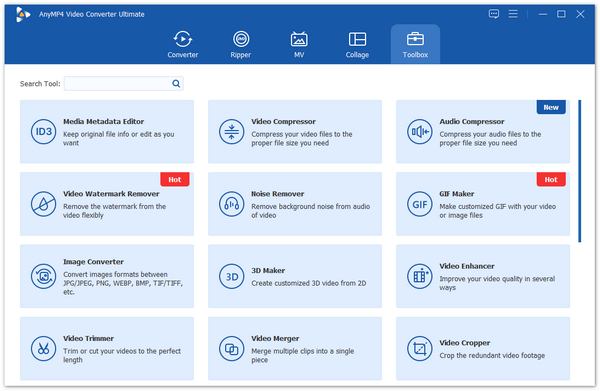
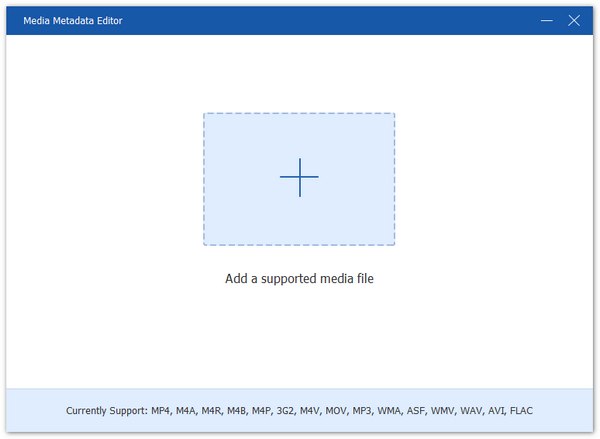
2. Click the big plus icon to add the music files MP4, M4A, M4R, M4P, etc., into this tool.
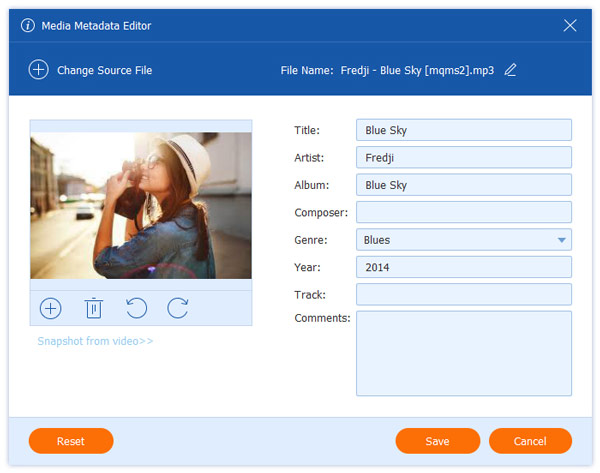
3. Edit the music tag, like album cover, title, artist, album, composer, genre, track, and comments. Then click Save.
PORS
- 70x Hardware Acceleration: The fastest tool in our test for processing 1000+ files.
- Format Powerhouse: Supports 500+ formats, ensuring compatibility with niche files.
- Clean Interface: Designed for 2026, it fits perfectly with the Windows 11 aesthetic.
- No Manual Work: Automatically fetches missing covers when converting files.
CONS
- License Required: The trial version has limits on the number of files you can save.
- Focus: It's a suite; users only needing a 1MB tagger might find it "too big."
3 MusicBrainz Picard - Best for Acoustic Fingerprinting
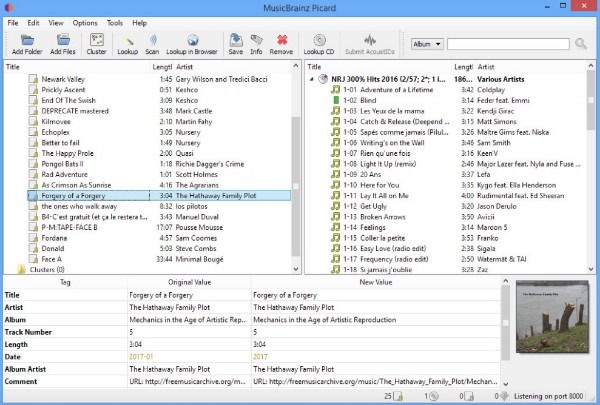
MusicBrainz Picard is an open-source powerhouse for automated metadata retrieval. It uses AcoustID audio fingerprinting to identify songs by their actual sound. Generally speaking, you can group audio files into albums and edit metadata information in the same album with ease.
Tips
Although this tool supports batch processing, do not drop 10,000 songs into Picard at once. The interface will likely crash. Process your library in batches of 500-1000 tracks.
Price: Free
OS Supported: Windows, Linux, Mac
Download URL: https://picard.musicbrainz.org/
Features
- Be identified by the actual music without metadata by AcoustID audio fingerprints.
- Tag and rename music files in albums for free.
- Download available Picard plugins for specific features.
- Supports MP3, FLAC, OGG, M4A, WMA, WAV, etc.
PORS
- Extreme Accuracy: The community database is less prone to "fan-made" errors.
- Completely Free: No ads, no tracking, and open-source for privacy-conscious users.
- Cross-Platform: Works identically on Windows, Linux, and macOS Sonoma.
- Plugin Support: A massive library of plugins to extend functionality.
CONS
- Learning Curve: Setting up advanced scripts and plugins requires some study.
- Workflow: The "Cluster and Scan" method can feel slow for small, 5-track edits.
- UI Style: Functional but visually utilitarian compared to paid software.
4 TagScanner - Best for Advanced Music Library Organizing
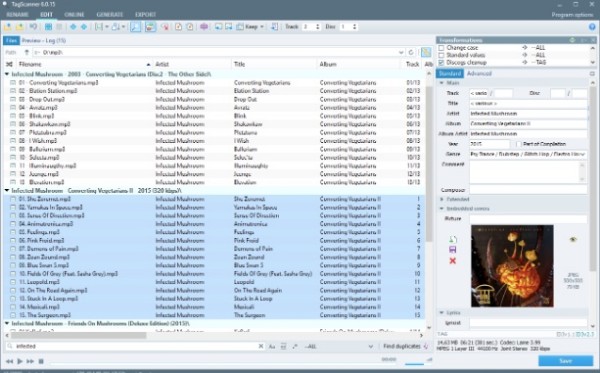
TagScanner is a comprehensive tool focused on music library organization. You can organize and tag audio files for free on PC. Its auto-fill and auto-rename features are beneficial for large music collections.
Tips
Watch out for the preview panel before hitting save; its macro substitution engine executes immediately, and undoing a massive file move on your hard drive is painful.
Price: Free
OS Supported: Windows 11
Download URL: https://www.xdlab.ru/en/
Features
- Rename files according to the tag and file information.
- Import album information and high-resolution album art from online databases.
- Generate tags from file or folder names smartly.
- Export information as HTML, XML, CSV and other formats.
PORS
- Organization King: Best tool for restructuring messy folder hierarchies.
- Multi-Language: Exceptional support for over 30 languages and Unicode.
- Built-in Player: Saves time by letting you verify the song without opening another app.
- Free & Feature-Rich: Offers professional tools at zero cost.
CONS
- Steep Learning Curve: The sheer number of tabs and settings can be confusing.
- No Mac Support: Strictly a Windows-only application.
- Interface Clarity: Icons and buttons can feel a bit small on high-res monitors.
5 foobar2000 - Best for Audiophiles & Custom Workflow
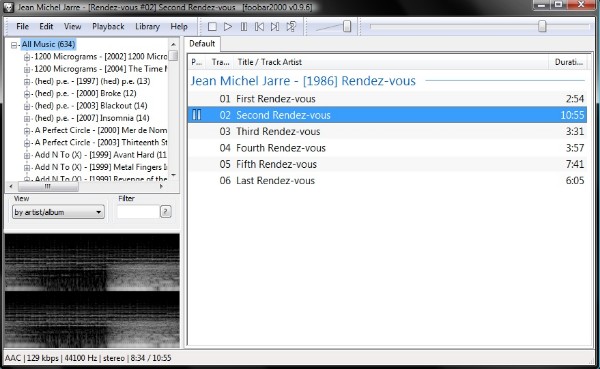
While primarily a player, foobar2000, features advanced tagging. You can edit tags of multiple tracks at the same time. If there are empty or incorrect tags, the "Automatically Fill Values" feature can transfer correct info quickly.
Tips
Download the "foo_utils" component from the community forum. It unlocks batch text operations that the vanilla installation lacks.
Price: Free
OS Supported: Windows, iOS, Android
Download URL: https://www.foobar2000.org/
Features
- Tag music collection with an advanced tagger component.
- Support MP3, AAC, CD Audio, WavPack and more.
- Get gapless playback while managing your library.
- Unicode support and customizable metadata fields.
PORS
- Audiophile Standard: Zero impact on audio quality and support for ReplayGain.
- Lightweight Mastery: Uses virtually no CPU, even when managing 100,000+ tracks.
- Extremely Flexible: You can design your own tagging interface with components.
- Multi-Platform: Native apps for both mobile and desktop.
CONS
- Not a Dedicated Tagger: Tagging is a secondary (though powerful) feature.
- UI Design: The "bare-bones" look requires effort to make it visually appealing.
- Technical Complexity: Not recommended for users who want a "1-click" fix.
6 Kid3 Tag Editor - Best for Cross-Platform Consistency
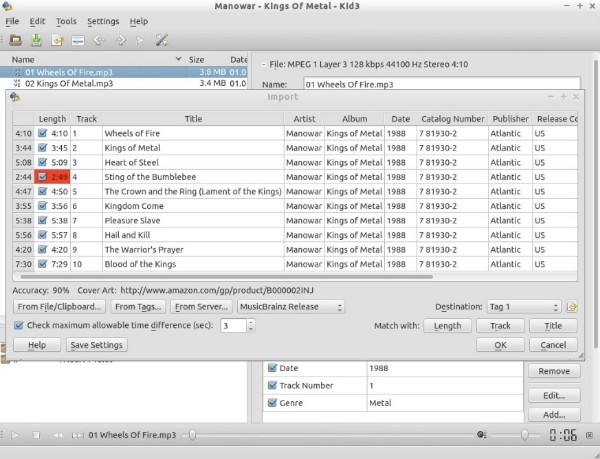
Kid3 is a powerful open-source audio tagger that handles virtually all audio formats, including MP3, FLAC, OGG, M4A, and WAV. In 2026, it remains a favorite for users who switch between different operating systems (Windows, Mac, Linux, Android) and need to maintain a clean music library. It is especially prized for its ability to edit and convert between ID3v1.1, ID3v2.3, and ID3v2.4 tags simultaneously.
Tips
Use the "Sync" function to instantly copy missing ID3v2 entries down to the legacy ID3v1 block for ancient hardware compatibility.
Price: Free (Open Source)
OS Supported: Windows 11/10, Linux, macOS Sonoma, Android
Download URL: https://kid3.sourceforge.io/
Features
- Tag Versioning: Seamlessly convert or sync between ID3v1.1, ID3v2.3, and ID3v2.4.
- Smart Generation: Generate tags from filenames or directory structures, and vice versa.
- Online Lookup: Import data from MusicBrainz, Discogs, Amazon, and gnudb.org.
- Scripting Power: Automate repetitive tasks using QML/JavaScript, D-Bus, or a command-line interface.
PORS
- Vast Format Support: Handles everything from standard MP3s to niche formats like Opus, Speex, and WavPack.
- Completely Free: Open-source with zero ads, tracking, or hidden "premium" paywalls.
- True Cross-Platform: Provides a consistent experience across all desktop and mobile platforms.
- Powerful Batching: Select an entire album to quickly set artist, year, and genre without repeated typing.
- Unicode Support: Excellent handling of international characters to prevent metadata corruption or gibberish text.
CONS
- Dated Interface: The UI is purely functional and might feel "retro" or cluttered to modern users.
- Learning Curve: It’s a bit technical; it takes some time to master the batch-processing logic.
- No Built-in Player: Unlike some competitors, you’ll need an external player to preview tracks while tagging.
- Android UI Quirks: Some users report navigation bar visibility issues on specific Android mobile devices.
Best 4 Free Online & Mobile MP3 Tag Editors
7 Maztr Audio Tag Editor - Best for Free Online Tagging
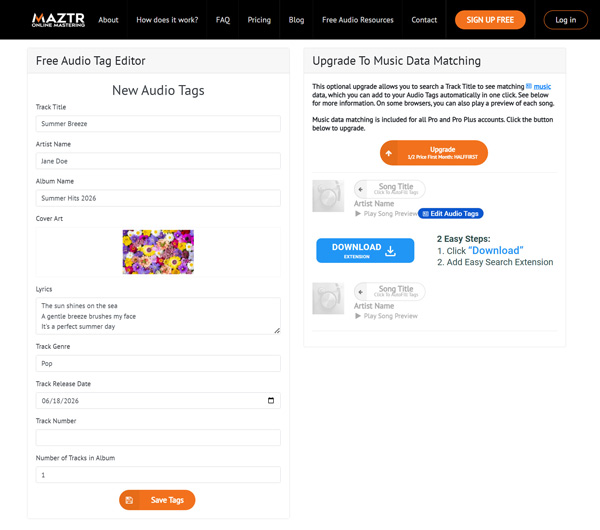
Maztr is a dedicated online audio suite built by audio engineers. Their free Audio Tag Editor runs entirely in your browser without requiring an account. You can easily upload tracks, type in missing metadata, and even drag-and-drop a new thumbnail image to embed as the permanent cover art.
Tips
Maztr has a strict file size limit for free users. If you are trying to tag a massive 1-hour DJ mix or a heavy podcast, the web uploader will reject it. Keep your uploads to standard single-track sizes.
Price: Free
OS Supported: Web Browser
URL: https://www.maztr.com/audiotageditor
Features
- Edit tags immediately without creating an account or verifying emails.
- Drag and drop local images directly into the browser to permanently embed them into your audio file.
- Unlike some web tools that only accept MP3s, Maztr natively supports editing OGG and M4A tags.
PROS
- Purpose-Built Interface: It is strictly an audio tag editor, meaning there is no confusing format conversion clutter.
- Lyrics Support: One of the rare online tools that allows you to manually copy and paste full lyrics into the audio file's metadata block.
CONS
- Cloud Dependency: You must upload your files to their servers and wait for the download to compile, which is tedious for large files.
- No Batch Editing: You can only process and download one audio file at a time.
- A Lot of Ads: You must be more careful to find the tool, because there are third-party ads and its premium ads.
8 TagMP3 - Best Online ID3 Editor for Individual Tracks
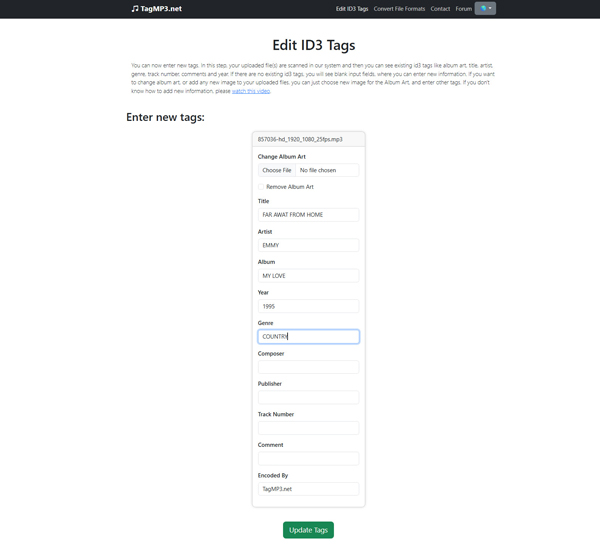
TagMP3 is a dedicated single-purpose web utility for MP3 music tag editing. You upload your audio file, it breaks down the existing ID3 fields, and lets you type in new values or upload custom JPEG artwork right in your browser tab. It then compiles the file and serves a fresh download link.
Tips
Ensure your local album art image is cropped into a perfect square (e.g., 500x500 pixels) before uploading, or the system will stretch the picture weirdly across your playback screen.
Price: Free
OS Supported: Web Browser
URL: https://tagmp3.net/
Features
- Instantly extracts and displays simple text fields for direct manual editing in the browser.
- Select any local image file from your device and embed it directly into the audio file container.
- Automatically translates legacy file data into modern web-friendly ID3v2 output links.
PROS
- No Configuration Hassles: Perfect for a 30-second fix on a single podcast clip or downloaded lecture before saving it.
- Simple Mechanics: Incredibly straightforward-upload file, edit text fields, select cover art, and download.
- No Account Required: Completely accessible without registering email accounts or answering sign-up prompts.
CONS
- Forces MP3 Compression: The tool converts everything back to standard MP3. If you upload a premium lossless FLAC or WAV file, it will downscale it, destroying your audio quality.
- Single File Limitation: Does not support folder uploads; you must process, type, and download files completely one by one.
- Heavy Ad Presence: The webpage is packed with confusing display ads that can easily trick users into clicking the wrong download link.
9 Banger.Show MP3 ID3 Tag Editor - Best for Privacy & Speed
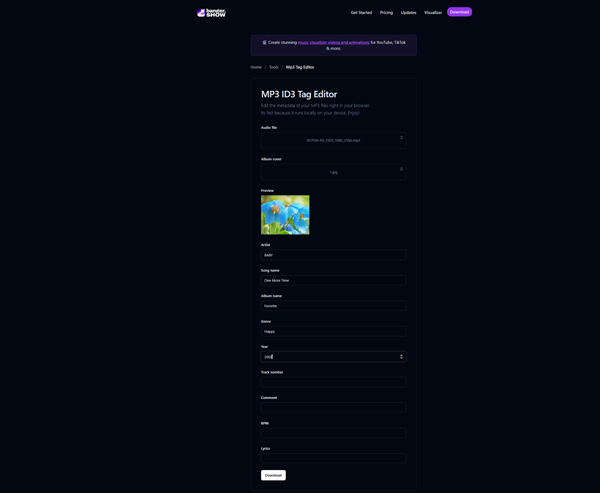
Most online tag editors require you to upload your personal music files to a remote server, which can be slow and raise privacy concerns. Banger.Show solves this by processing your MP3 files locally right inside your web browser. The data never leaves your computer, making it incredibly fast and completely secure.
Tips
Make sure you aren't using an aggressive ad-blocker or strict JavaScript blocker (like NoScript) in your browser, as this tool relies entirely on local browser scripts to edit your files.
Price: Free
OS Supported: Web Browser
URL: https://banger.show/tools/mp3-tag-editor
Features
- Edits the ID3 headers locally using JavaScript, bypassing the need for cloud servers.
- Because no uploading or downloading is required, saving the tagged file back to your hard drive is instantaneous.
- Clean, minimalist text fields for Title, Artist, Album, Genre, and Track Number.
PROS
- Lightning Fast: You can edit a 200MB audio file instantly because your internet upload speed doesn't matter.
- Absolute Privacy: Your audio files are never sent to a third-party server, making it safe for unreleased original music or private recordings.
- Zero Ads: A refreshingly clean interface with absolutely no banner ads or fake download buttons.
CONS
- MP3 Only: It strictly supports the MP3 format. You cannot drop FLAC or WAV files into this editor.
- No Album Art Embedding: It lacks the visual interface to upload and attach custom JPEG covers to your audio tracks.
10 Star Music Tag Editor - Best for Android Mobile Tagging
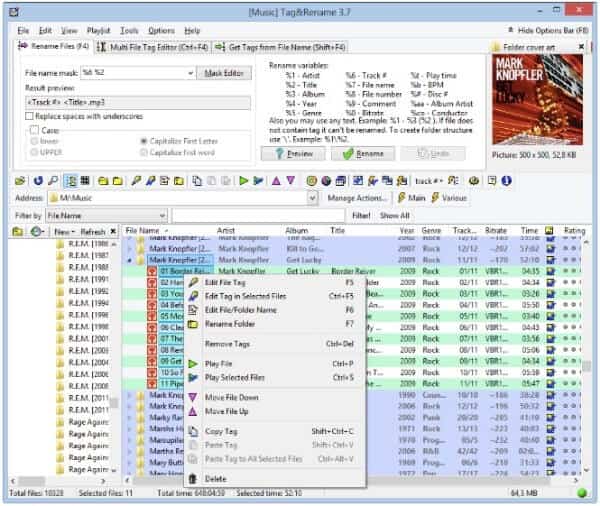
Tag & Rename supports all popular music formats from Windows Media, Apple iTunes, and other lossless codecs. It offers many additional tag fields including composer, conductor, and album artist.
Tips
Newer Android OS versions have strict scoped storage permissions. You must manually grant the app full root access to your SD card directory, or your edits won't save.
Price: $29.95
OS Supported: Windows
Download URL: http://www.softpointer.com/tr.htm
Features
- Get manual and batch ID3 tag editor modes.
- Use online freedb database to fix and complete file tags automatically.
- Load music titles and high-resolution album art from Amazon and Discogs.
- Import music tags from XLS files.
PORS
- Granular Control: Supports specialized fields that free taggers often miss.
- Reliable DB Lookups: The Amazon lookup is particularly good for US/UK releases.
- Spreadsheet Import: The ability to import from XLS is a lifesaver for catalogers.
- Stable: Extremely reliable even with very large files.
CONS
- Paid Software: Many free alternatives offer similar (though less refined) features.
- No Mac Support: Strictly limited to the Windows platform.
- Dated UI: Has not been significantly modernized in several years.




 Add your comments to join the discussion here